12BACK OFFICE
The owner's toolkit
Everything beyond the counter, in one chapter: money insight, the retention engine, the team, and the settings that shape it all.
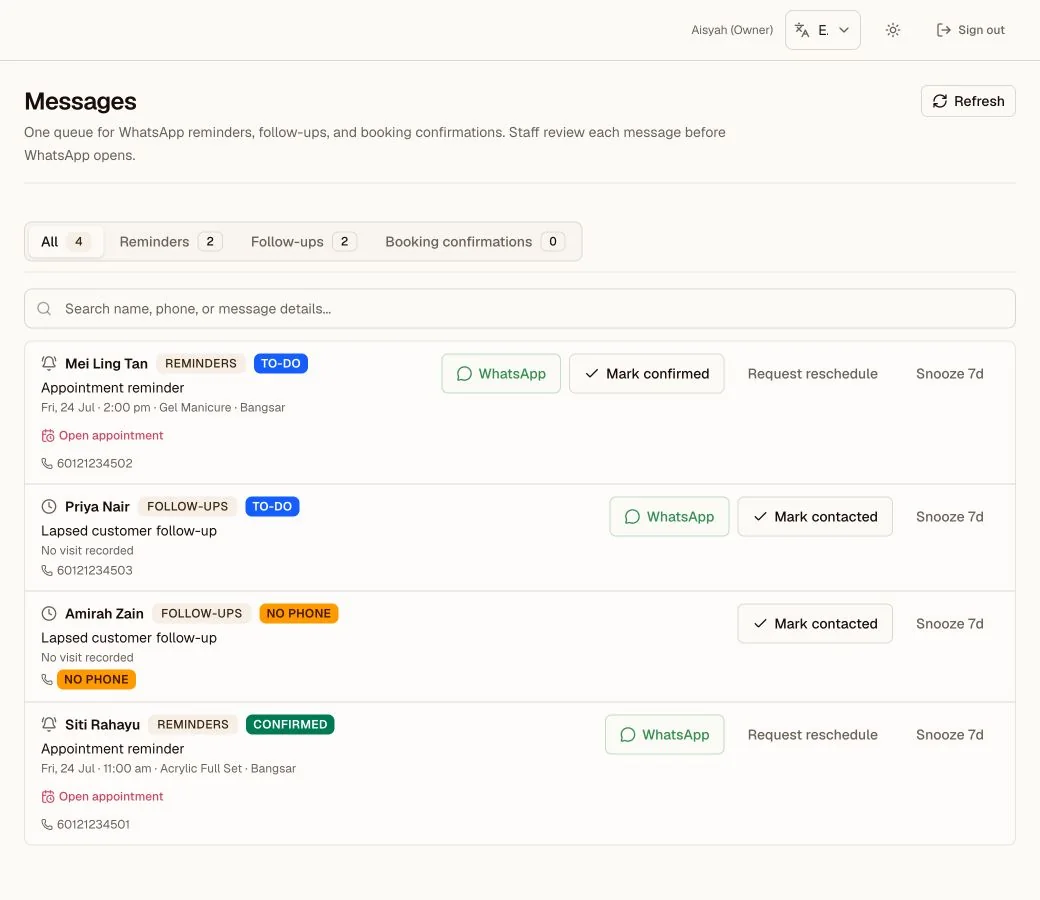
Messages worklist
Review due WhatsApp work by lane, then record the action the team took.
- 1Lane counts show which message work is waiting.
- 2WhatsApp opens a prepared message for staff review.
- 3Status actions keep the queue honest without claiming delivery.
12.1 Knowing your numbers
- Overview (dashboard): the first action, metric order, and section order match the business type and enabled modules. The Action Center ranks decisions and exceptions that need the owner. A revenue drop or a day with no sales is business context, not an action by itself. The home works on phones as well as on desktop, so there is no separate Mobile Home, and the Daily Checklist has been retired: its cards live on the home. The Action Center also lists days from the last fourteen that still need a daily closing (with a note when no cash was taken), tomorrow's reminders and open follow-ups, and exceptions such as a void spike or a team member on duty with no sales. A seven-day sales glance sits under today's money. When today's revenue is RM0, the revenue metric says whether the selected branch is closed today, not open yet, open until its effective closing time, or already closed, and shows how many people are scheduled now. Once at least three comparable days exist, revenue pace uses the median of the prior four same weekdays at the same operating-day progress. A repair workspace keeps the four headline metrics, a clear Received, In progress, and Ready pipeline, the Action Center, and money on its default Overview. Open Jobs for stage and priority controls, and use Reports or the Audit Log for detail. Other workspaces keep the matching queue, schedule, performance, and branch sections. Customize remains on desktop and lets you reorder or hide sections on this device. The saved order also applies on small screens. Open Reports, Receipts, Messages, or Settings for detailed trends and email activity. Money calculations, branch filters, and drill-down links stay the same. Today's sales follow the Malaysia calendar from midnight to midnight, including sales before 8am.
- Reports: the wider lens. The report cards and detailed sections follow the priorities of your business type. Revenue, refunds, tender totals, commissions, and date filters use the same calculations in every workspace. The Compared with switch sets every change figure against the previous period or the same period last year, and the link is kept in the URL. The Staff Comparison table sorts the team by commission, sales, transactions, or average sale, and the staff CSV carries the same columns.
- Receipts: every sale, filterable (Active / Voided / Refunded / Partial), day summaries, CSV export.
- Owner data export: Settings > Export includes the Wellness visit, consent-version, event, and practitioner-note records, plus the complete Professional Case datasets: cases, scope versions, approvals, the document register, status history, work and appointment links, custody, updates, payment allocations, and financial events. Receipt exports keep the exact visit or case link and payment purpose.
- E-invoice sandbox: build and submit one consolidated test document for a completed month. The preview excludes voided receipts and blocks any month that has a linked refund.
- Commissions: monthly per-staff earnings from their credited sales and your configured rates; export CSV for payroll. Commission starts off for every team member. Turn it on only for people who should earn it; this affects new service, package, and membership sales only. Set one percentage or fixed RM rate for all active services, packages, or memberships, then adjust individual items when needed. New sales save the rate used at checkout, so later edits do not rewrite past payroll. Voids remove commission; refunds subtract on their issue date; free visits earn none.
- Audit Log: every sensitive action with actor, time, and reason. Booking request acceptance, decline, and automatic expiry also appear here, and so does handing back a job that still owes money, recorded with the outstanding balance and the reason given. Each Repair Job Account also keeps its own estimate versions, decisions, stage corrections, payments, voids, refunds, waivers, handovers, warranty start, cancellation, reopen, and follow-up links. A linked receipt number opens that exact receipt. When something looks wrong, the answer is here.
12.2 The retention engine
- Messages: the daily review queue. It contains the lanes enabled for the workspace. Appointment-led workspaces can open on due booking confirmations. Retail workspaces can open on due ready-job contacts. Workspaces without bookings show follow-ups without empty booking lanes. Start morning queue presents due reminders and follow-ups one at a time. Staff tap, review, edit if needed, then send from your number. Kipas AI does not write messages addressed to customers in this release. The WhatsApp button uses the text currently on screen and stays unavailable when the draft is blank. Deterministic controls exclude customers marked Do not contact from reminder and follow-up targets, independent of AI. The queue records each WhatsApp open or Skip action. Mark contacted or Snooze 7d keeps the full list clean.
- Reminders: appointment nudges due to go out, same review-first pattern.
- Messages > Follow-ups: your daily win-back lane. It includes Expiring credit or memberships, unused Free visits, Lapsed customers, and recent visitors with No next booking. The Suggested outreach section adds customers with package credit or memberships expiring within 30 days (a membership renewed on the same plan drops out), customers who have visited before but not in the past 60 days and have no future appointment, and birthdays in the current Malaysia month. A customer with no recorded visit is not lapsed. Booking contacts and customers marked Do not contact are excluded. The section shows at most 200 lapsed targets and 150 targets for each package-expiry, membership-expiry, and birthday kind. If a server result exceeds a cap, a list-limited notice says that more matching records may exist outside the current result. A load error shows Retry instead of an empty list. A staff account without an assigned branch asks the owner for a branch assignment and does not show Retry. Each prepared WhatsApp message uses the customer's preferred name and the real visit count, spend, last visit, credit, plan, and expiry from their records. With a recommended tone it is written in the customer's preferred language when one is set, otherwise in the app language; custom wording is used exactly as written. A number that cannot open in WhatsApp keeps its row, with the reason and a link to the customer record, and has no WhatsApp button. Staff review each message and send it manually, one tap per customer. Snooze 7d hides a target for seven days. Mark contacted hides a lapsed customer for 30 days or until a new visit, an expiring package or membership until it no longer qualifies, and a birthday for the rest of that month. A Free visits or No next booking row marked contacted returns the next day, and a free visit is offered only while its membership is still running. Messages, My day, and the home's open follow-ups count all apply the same rule.
- Promotions: first choose who receives the reward. The form explains the full rule before you save it. Birthday rules use the issue period that you choose later. For customers who have not returned, choose how many days since their last completed visit; a customer with an upcoming appointment does not qualify. Add branch, service, membership, package, or visit conditions only when you need them. Choose a simple duration such as 1 month or 1 year, or set custom dates. A saved manual promotion can make each voucher expire when the promotion ends, 1, 3, 6, or 12 months after issue, or never. The same saved reward can be issued to different customers without rebuilding it; each customer receives a unique voucher and expiry. Issue voucher sends a saved promotion to one registered customer or creates a one-off voucher. Issue to matching customers lets you choose a clear issue period such as This month or Next 30 days. Promotion rewards and saved validity stay locked during issue, retries do not create duplicates, and every voucher is tracked to redemption.
12.3 The team
- Staff: roster, roles, per-person sales and last-active; add staff, send secure account emails, deactivate. Account status distinguishes Invite not sent, Invite sent, Password set, and Signed in. A Pre-tracking badge means authentication proves prior account access, but the event happened before lifecycle tracking. The exact time was not recorded. Not recorded means there is not enough evidence to claim an invite or password step. Repeat account emails have a ten-minute cooldown. (Tip: a kiosk login type exists for a shared counter device.)
- Schedule: working hours, custom hours, days off; feeds booking availability. Its title and guidance use the workspace team language, such as practitioners or team members. If its roster cannot load, it shows Retry instead of pretending the location has no team. Copy Last Week only copies people who are still active at the selected location. An owner who also works the floor appears in this grid at whichever location is selected, the same as any other team member.
- Attendance: clock-ins, network-verified (only from your approved workplace network, set in Attendance Networks), optional selfie sampling. Staff scheduled now on the dashboard comes from Schedule and checks each shift against the current Malaysia time. Attendance shows actual clock-ins separately. Team members with a scheduled day off show a Day off badge and are not counted as "Not in yet".
12.4 Settings that matter
Settings has six categories: Personal, Business, Sales and payments, Customers and messages, Team and access, and Setup and data. Search opens the exact section page. Each section keeps its own changes and has its own Save and Discard changes actions. A failed section save keeps the edits on screen and does not submit another section.
| SETTING | WHAT IT CONTROLS |
|---|---|
| Workspace | Your personal Simple or Full switch, first in the Business group. It is per person, saves the moment you tap it, and never changes data or permissions. Staff and managers carry the same switch in the app header and profile sheet. |
| Business type, workday, and modules | Kipas sets the business type during onboarding. Contact support to request a change. Owners of non-salon workspaces can choose a supported workday pattern and the workspace modules the team sees. An Other Service pattern must have its required modules. Setup shows the missing module and links back to Settings. Salon workspaces keep their current layout. |
| Business identity | Set the full name, short name, app mark, and app theme. Logo uploads save at once. The workspace logo also appears above your business name in customer email. Salon and beauty workspaces keep the Kipas beauty banner. Other business types use a neutral header. Each identity or brand section has its own Save action. |
| Receipts | Set the printed name size, letterhead, logo, position, alignment, phone, receipt SST number, footer, and notes in one section. Choose which BRN, TIN, MSIC, and supplier SST lines print. Each line prints only when it is on and has a value. Phones show the preview inside the section. Larger screens keep the preview beside the form. Receipt-logo uploads and removal save at once. |
| SST | Tax on/off, rate, and whether your prices already include tax. |
| Google reviews | Paste the review link from Google Business Profile. Receipt emails and WhatsApp receipt messages include it after an unrefunded sale. Leave it empty to omit the link. |
| Payments | Manage two separate QR paths. The static DuitNow QR is an owner-uploaded image that staff verify in the business bank or provider app. The Fiuu sandbox connection stores encrypted OPA credentials, shows only a fingerprint, requires a successful connection test, and remains unavailable until both the owner and the platform gate enable it. Saved credentials are never shown again. |
| Repair jobs | For Retail and Services workspaces, choose whether estimate approval is required, set the default deposit calculation, and set optional warranty defaults. The warranty starts only when the property is collected. Staff can override the warranty setting, duration, and terms on each job. |
| Branches | Address & phone per outlet; they appear on that branch's receipts. |
| Online Booking | Turn public booking requests on or off. Copy the public link, open it, share it on WhatsApp, or use its QR code. |
| WhatsApp messages | Choose one business-wide tone: Friendly, Short, or Formal. With a recommended tone, follow-up messages are written in each customer's preferred language when one is set. The page shows realistic customer previews and keeps technical details hidden. Custom wording remains available under Advanced settings and stays saved when you switch to a recommended tone. An owner can edit the birthday follow-up template there. Kipas prepares the message for staff to check. It never sends by itself. |
| E-invoice profile | Supplier identifiers, address, contact details, and encrypted MyInvois sandbox credentials. The supplier SST field is separate from the receipt SST field. When it is empty, Settings starts it with the receipt value. Credentials save with their own button. Use Reports to preview and submit a completed month. Sandbox results are tests only. |
| Page visibility | Which pages staff and managers can see. |
| Customer emails | The Owner emails row controls the Monday digest. Customer email switches control reminders and birthday messages. Customer emails are off by default. They use the business name, include an unsubscribe link, and never replace the WhatsApp review queue. An unsubscribe blocks that email address from every customer email for the business, including another customer profile that uses the same address. You can edit the reminder and birthday wording and see a live preview. The preview loads the current published Kipas wording used by real sends. If that wording is unavailable, Settings labels the sample as non-exact and offers a retry. The preview also shows the closing line that tells a customer how to reach you: a reply invitation when your workspace has a reply-to address, otherwise your branch phone number. Kipas sets the brand credit on customer emails, prepared WhatsApp messages, and PDF receipts: full credit with onlykipas.com, short credit, or no Powered by Kipas line. Leave a field empty to keep the standard wording. Every workspace has a monthly sending allowance; when it runs low the workspace shows it, and when it runs out sending pauses until the next month. Kipas can also pause a workspace's sending entirely if something looks wrong; email hi@onlykipas.com if sending seems stopped while your allowance is not used up. |
| Weekly digest | This switch is in Customer emails under Owner emails. The Monday email contains last week's totals and exceptions. It highlights voids, refunds, failed reminder attempts, and booking requests that expired without an answer. |
Prefer everything on one page? Read the whole guide.