Daily closing
Ten minutes each night that buy you books you can trust. One closing per branch, per day.
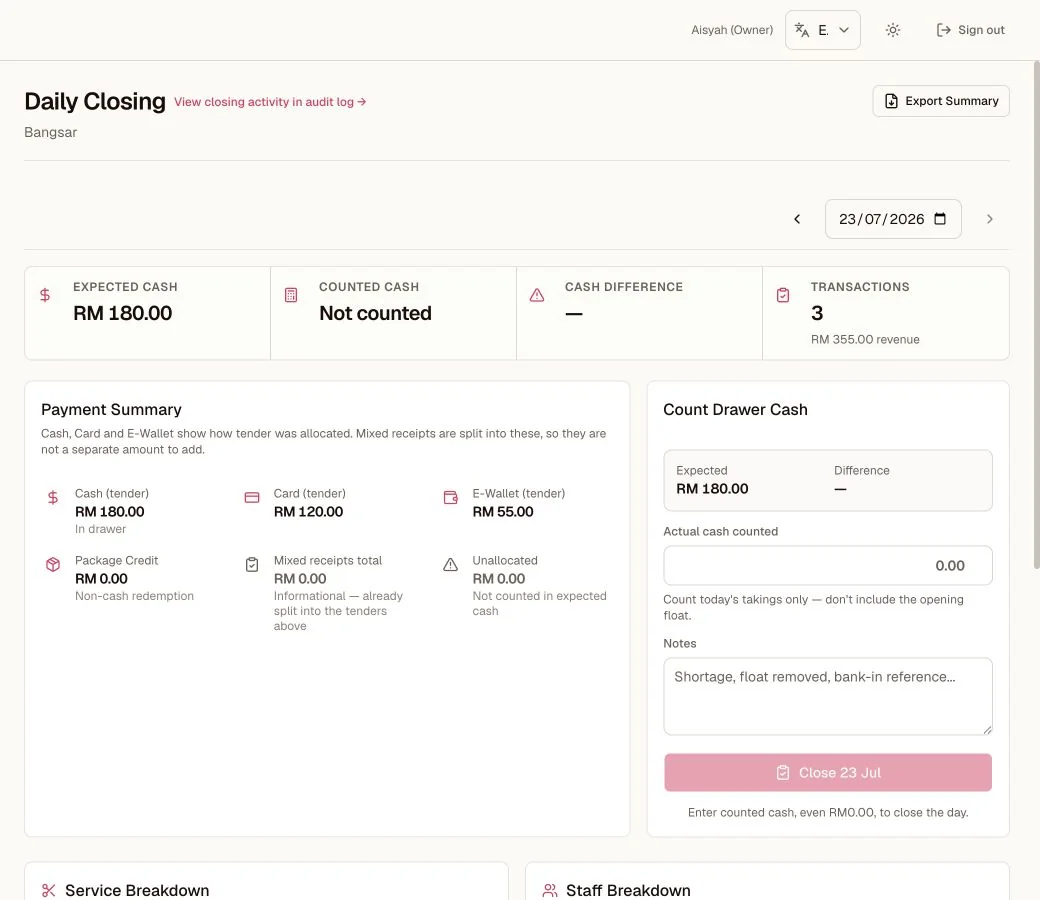
Daily Closing
Compare expected and counted cash, record the real variance, then close the day.
- 1The summary separates expected cash, counted cash, and the difference.
- 2Tender totals explain how the expected cash was built.
- 3The person closing enters the actual cash before the day can lock.
11.1 What the page tells you (Admin → Daily Closing)
- Total revenue and transaction count for the selected date and branch.
- Tenders: how much came in by Cash, Card, E-Wallet.
- Refunds by tender (money returned that day).
- Package Credit used: informational; prepaid value spent, not new money.
- Split receipts: informational; their parts are already inside the tenders.
PAID BUT NOT MATCHED
A Fiuu payment can be confirmed by the provider while the sale still fails a server check. Daily Closing shows these payments in a separate read-only list. They are not inside the totals, because no receipt was ever written for them, and the day will not close while any of them are still unmatched. Resolve each one, then close.
11.2 Closing, step by step
- 1
Count the cash
Count the cash in the drawer.
- 2
Enter counted cash
Enter the counted cash. If the drawer took no cash that day (card and e-wallet only, or no sales at all), No cash today; close at RM0.00 fills in RM0.00 and opens the confirm step in one tap.
- 3
Review the summary
Review the summary; it notes voided receipts excluded, credit used, and any unallocated amount.
- 4
Close the day
Close the day. The page records who closed and the cash difference. If a sale, void, or refund changes while the page loads or while you count, Kipas stops the close and asks you to review a fresh summary.
11.3 The three warnings, translated
| WARNING | MEANING | WHAT TO DO |
|---|---|---|
| Cash difference | Counted cash ≠ expected cash. Small differences are normal life. | Recount. Still off? Look for a missed sale, a refund, or a void. Enter the real count and close; honesty beats tidiness. |
| Unallocated | A mixed receipt has a missing, incomplete, or invalid tender split. Its unallocated amount is not assigned to cash, card, or e-wallet. | Open the receipt and check how it was paid. Correct the split if you can, or leave historical data unallocated. |
| Voided excluded | Reassurance, not a problem: cancelled sales were left out of totals. | Nothing. |
11.4 Reopening
Closed too early or need to fix something? Open that date → Reopen → make the correction (void, refund) → close again. The day re-locks with the correction inside.
WHY THE APP WON'T LET YOU SKIP THIS
Closing is what makes tomorrow's "vs yesterday" cards, commissions, and reports mean something. A business that closes every night knows where its money is. A business that does not is guessing.
Prefer everything on one page? Read the whole guide.